August 31, 2026
英国公司最新自助年审详细步骤(Confirmation Statement)
友情提醒:这篇文章适用于之前通过自助注册英国公司的朋友。根据 Companies House 的规定,英国公司每年都需要提交 Confirmation Statement,也就是我们俗称的年审(之前官方也叫 annual return)。这篇文章非常详细地记录了我自己在 2026 年 8 月 17 号完成年审的步骤截图,供大家参考。
如果是新朋友,想要先自助申请英国公司,可以点击这里直接购买同样也是我写的《出海收款指南》,通过注册英国公司开通 Stripe 账户进行全球收款。
年审之前的准备
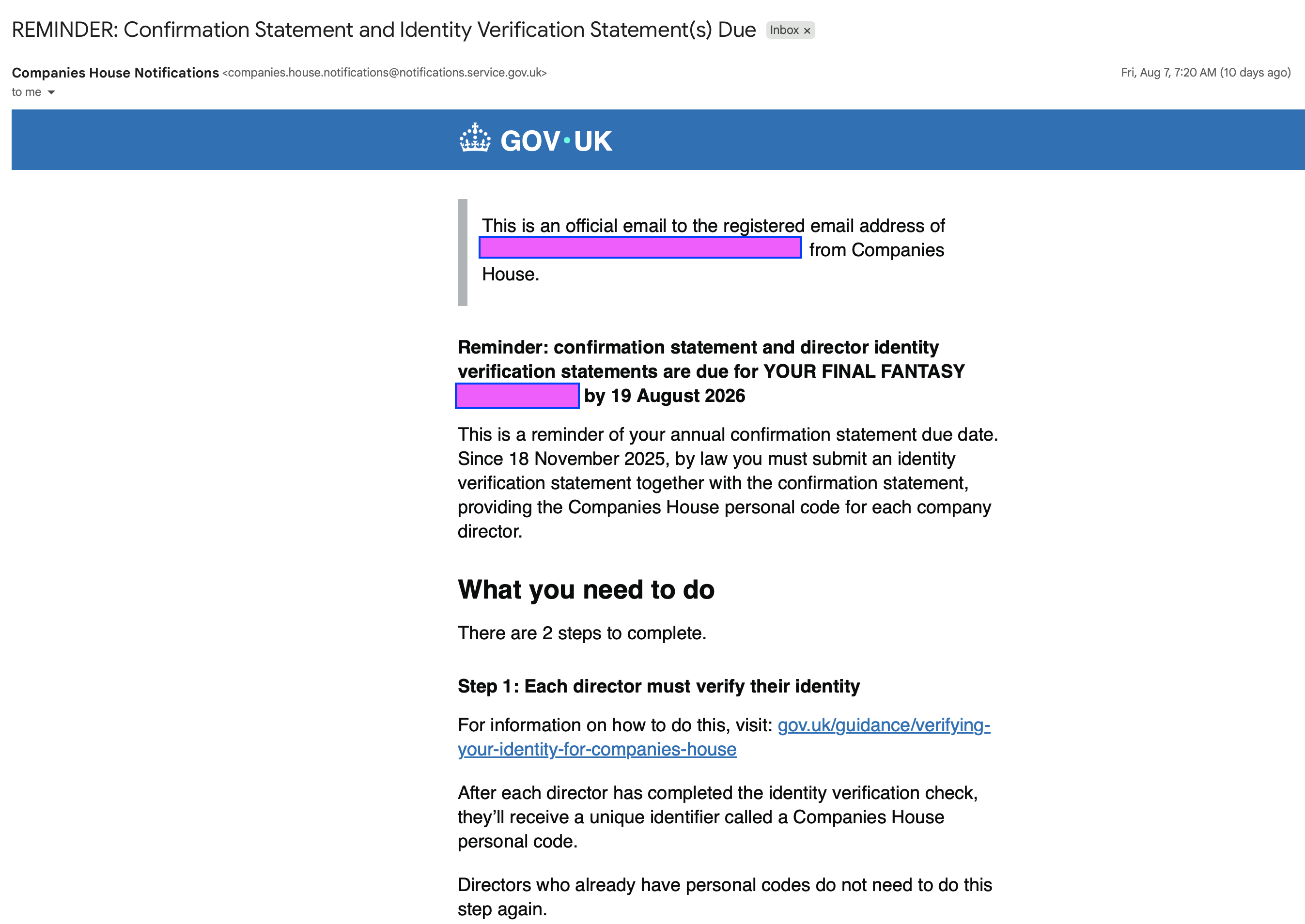
一般来说,当你的英国公司快需要年审的时候,Companies House 会给你发送类似下方的提醒邮件(标题是 REMINDER: Confirmation Statement and Identity Verification Statement(s) Due),告诉你今年最晚什么时候需要完成年审。如果你不知道自己公司的年审时间,也可以在 https://www.gov.uk/get-information-about-a-company 输入你的公司名进行查询。
邮件里的关键信息,我帮大家整理出来:
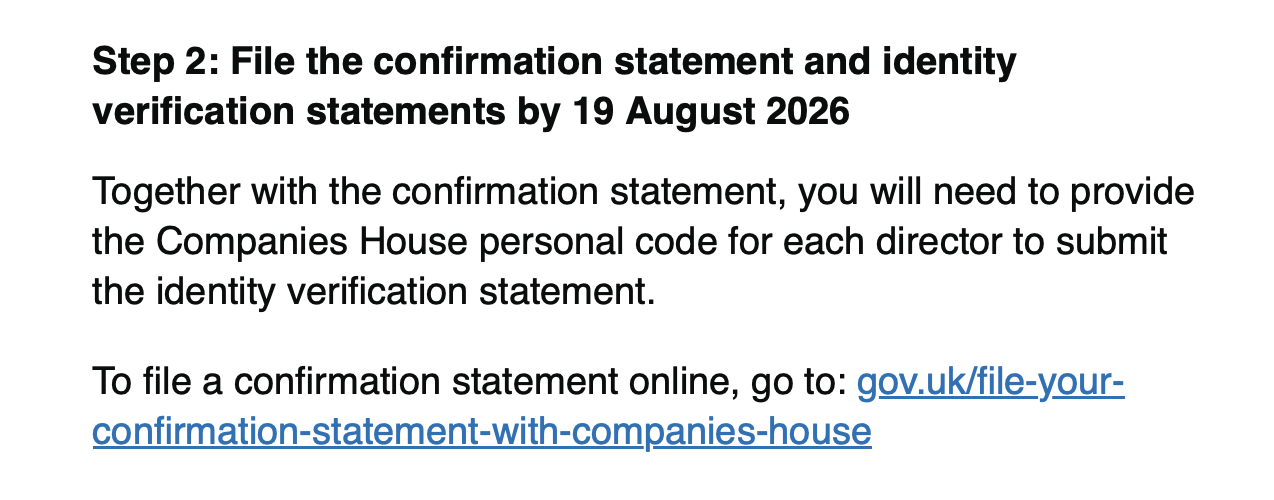
以我的公司为例,邮件提醒我需要在 19 August 2026 之前提交 confirmation statement 和 director 的身份验证声明。从 2025 年 11 月 18 日起,法律要求提交 confirmation statement 时必须一并提交身份验证声明(identity verification statement),提供每位 director 的 Companies House personal code,下文也会提到。
也就是说,核心任务是:在截止日期前提交 confirmation statement 和身份验证声明。提交入口是 https://www.gov.uk/file-your-confirmation-statement-with-companies-house。
在年审之前,需要你已经完成过身份认证,也就是获得过自己的 Personal Code,这个 code 在后面的年审中是会用到的。我之前也写了获取 Personal Code 的教程,如果需要,同样也可以在这里购买,或者自行申请即可。
友情提醒
如果你没有按时年审,会有什么样的后果呢?根据官方的说法:
- 可能会产生金融罚款
- Companies House 会因为你的公司没有年审,发布经营异常的提示,公开可查
- 可能会从公司名单中移除,影响银行账户和信用
- PSC 责任人可能会产生连带责任
当然,如果你不想维持这家公司了,也可以选择在这里注销公司:https://www.gov.uk/strike-off-your-company-from-companies-register
费用说明
从2026年2月1日开始,年审的费用从往年的 34 英镑上涨到了 50 英镑。所以这次我自己的年审也是一共只花了 50 英镑,没有其它费用。
有些朋友会问,原先的地址是否需要续费?我自己是暂时没有续费原来的地址,但随时也可能会有收政府信件的需求,如果不放心的话,还是建议续费地址。推荐的续费店铺,在《出海收款指南》中同样有提供。你也可以自行寻找。
目前来看,在年审的过程中是不需要准备额外信息的。
详细步骤截图
下面按我实际操作的顺序,把每一步的截图和界面上的关键内容整理出来。
第一步:进入官方年审入口
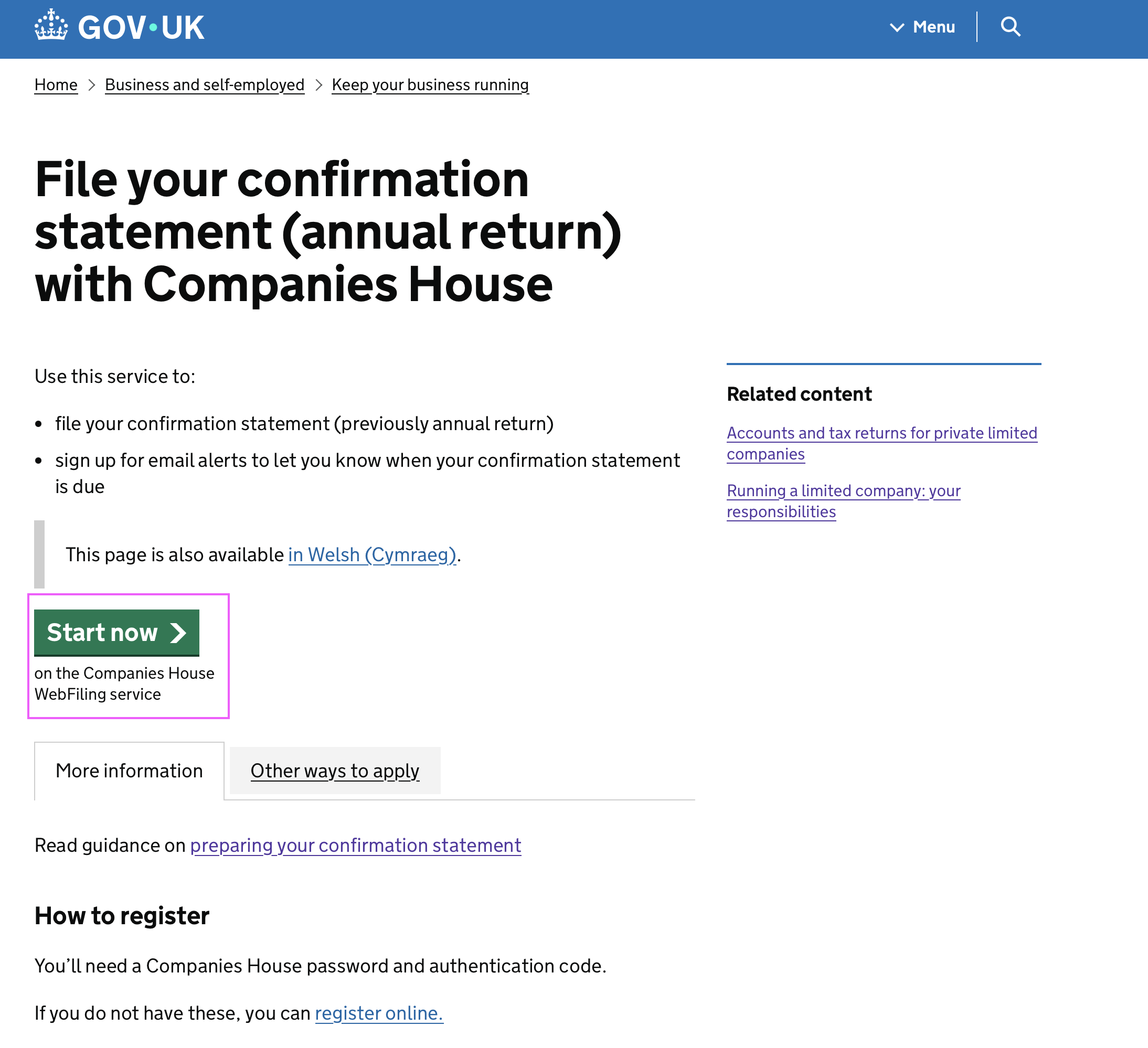
打开 https://www.gov.uk/file-your-confirmation-statement-with-companies-house ,这个页面就是官方的年审入口(File your confirmation statement (annual return) with Companies House)。页面说明这个服务用来:
- 提交 confirmation statement(之前叫 annual return)
- 订阅邮件提醒,在年审到期前通知你
点击绿色的 Start now 按钮,进入 Companies House WebFiling 服务。
第二步:登录 WebFiling(现在改用 GOV.UK One Login)
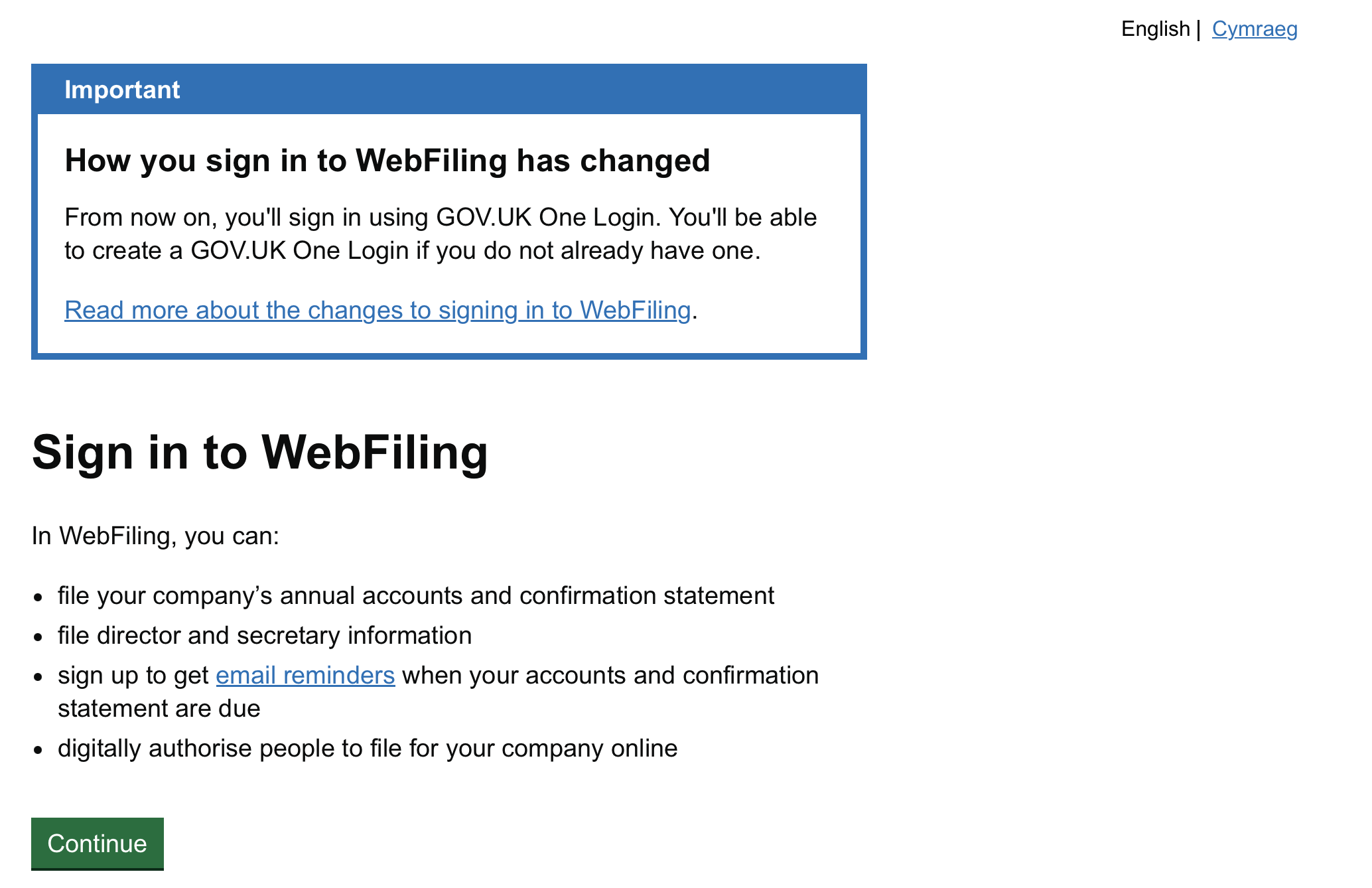
进入 Sign in to WebFiling 页面。注意页面顶部有个重要提示:WebFiling 的登录方式变了——从现在开始需要使用 GOV.UK One Login 登录,没有的话可以现场创建一个。
在 WebFiling 里你可以:提交公司年账和 confirmation statement、提交 director/secretary 信息、订阅到期邮件提醒、在线授权他人为公司提交文件。点击 Continue 继续。
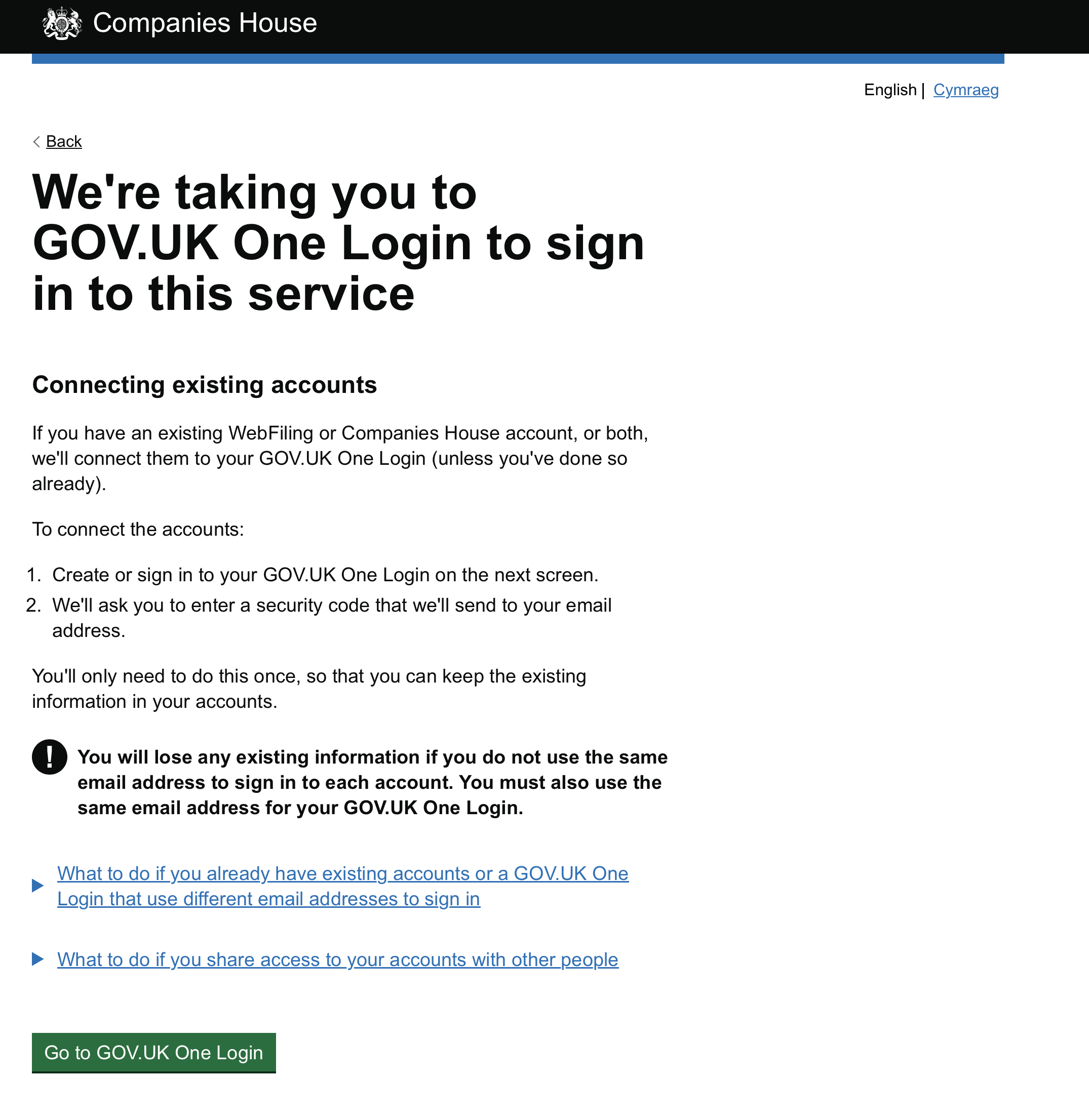
接下来是一个过渡页:We're taking you to GOV.UK One Login to sign in to this service。这一页讲的是账号关联(Connecting existing accounts):如果你已经有 WebFiling 或 Companies House 账号,系统会把它们关联到你的 GOV.UK One Login 上,只需要做一次。
⚠️ 这一页有个加粗的警告要特别注意:如果你各个账号用的不是同一个邮箱,已有的信息会丢失。你的 GOV.UK One Login 也必须用同一个邮箱。点击 Go to GOV.UK One Login 继续。
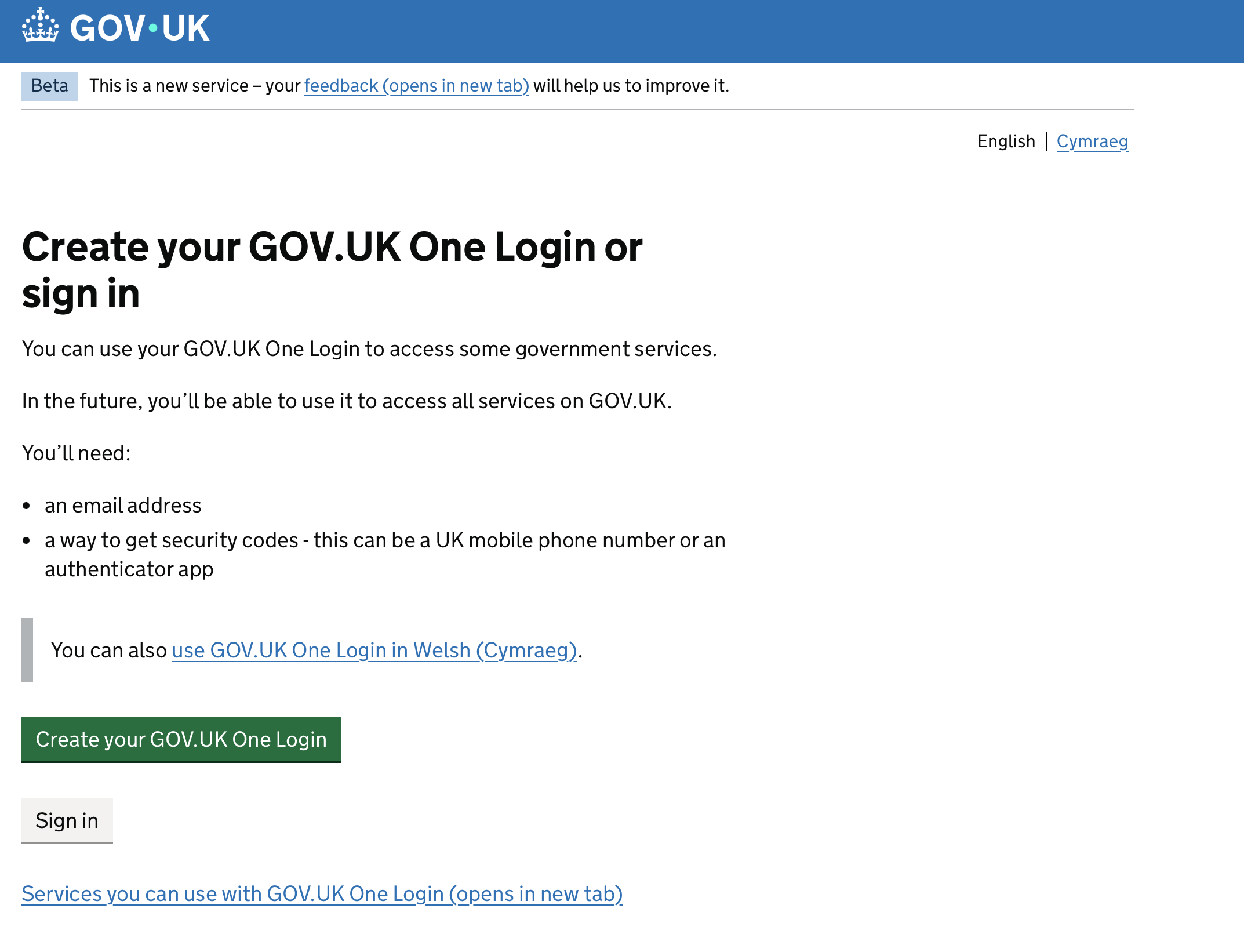
然后是 Create your GOV.UK One Login or sign in 页面。创建 One Login 需要:
- 一个邮箱地址
- 一个接收安全码(security code)的方式——可以是英国手机号,或者一个身份验证器 App(authenticator app)
我这里因为之前已经注册过,直接点 Sign in 登录即可;没有的朋友点绿色的 Create your GOV.UK One Login 创建一个,记得邮箱要和你 WebFiling 用的邮箱保持一致。
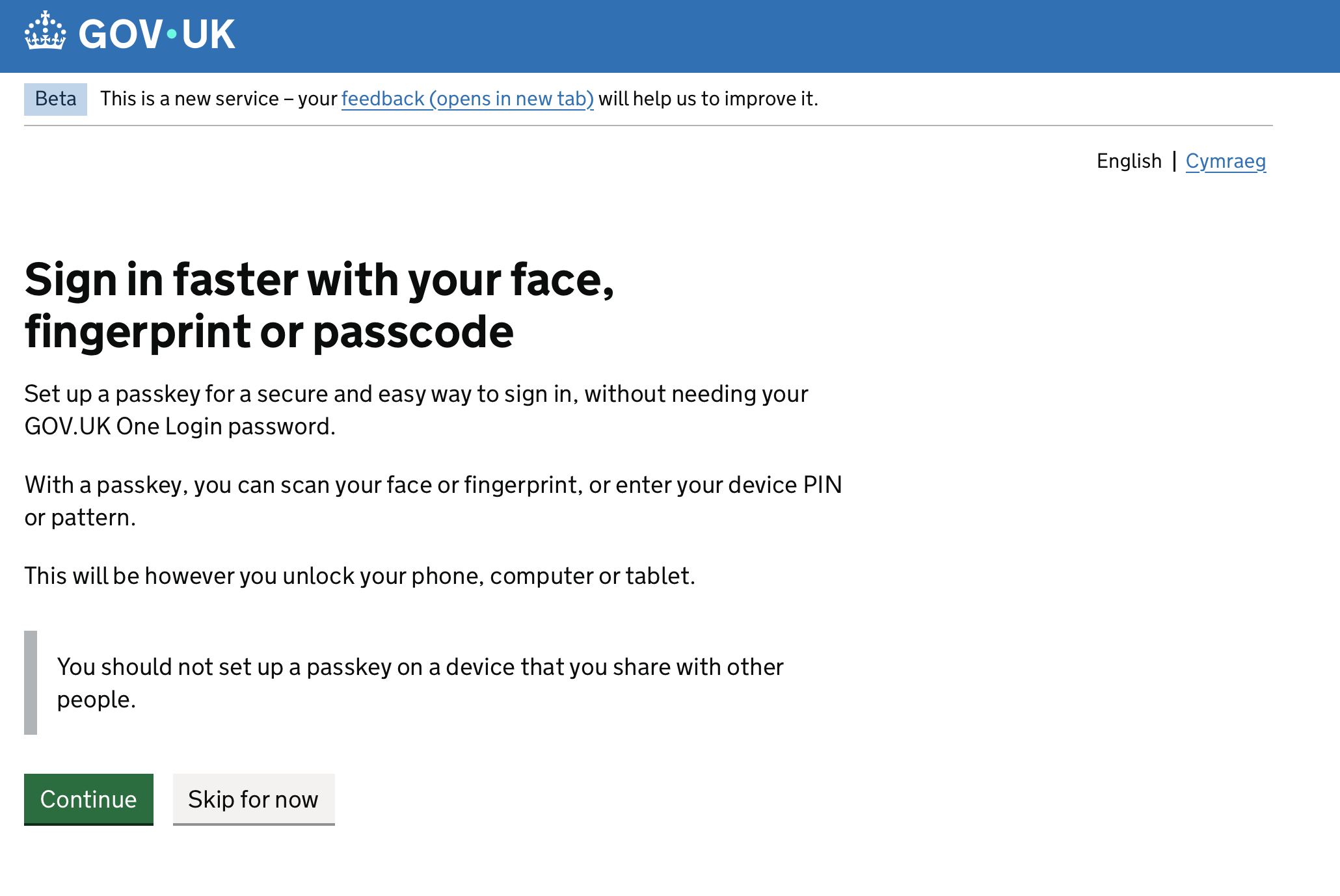
登录过程中会弹出一个可选步骤:Sign in faster with your face, fingerprint or passcode,也就是设置 passkey(用面容 / 指纹 / 设备密码快捷登录)。这个不是必须的,点 Skip for now 跳过也完全没问题。
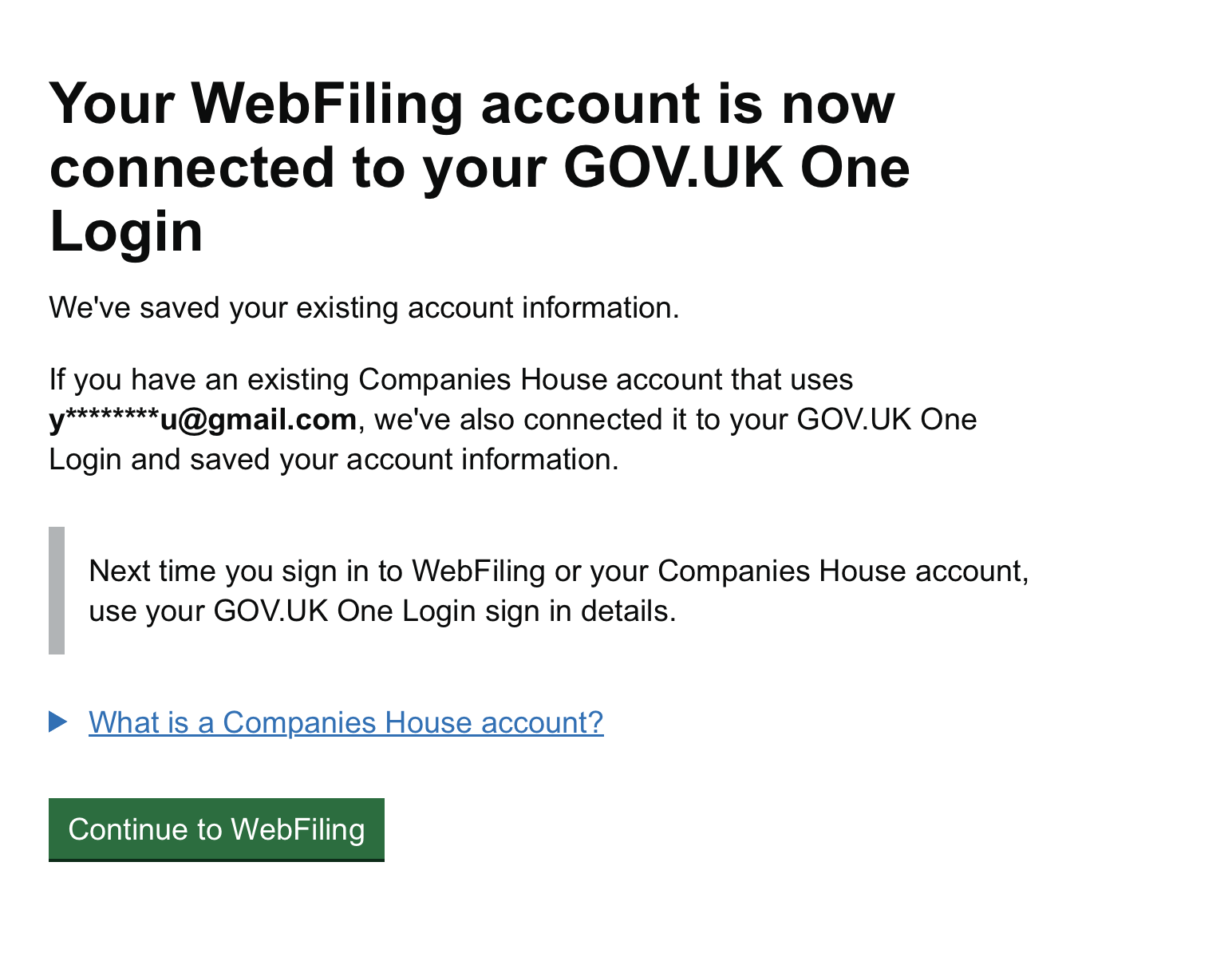
登录成功后会看到确认页:Your WebFiling account is now connected to your GOV.UK One Login——你的 WebFiling 账号已经关联到 GOV.UK One Login 了,之前的账号信息都保留着。以后再登录 WebFiling 或 Companies House 账号,直接用 One Login 的登录方式即可。点击 Continue to WebFiling。
第三步:选择公司,进入年审表单
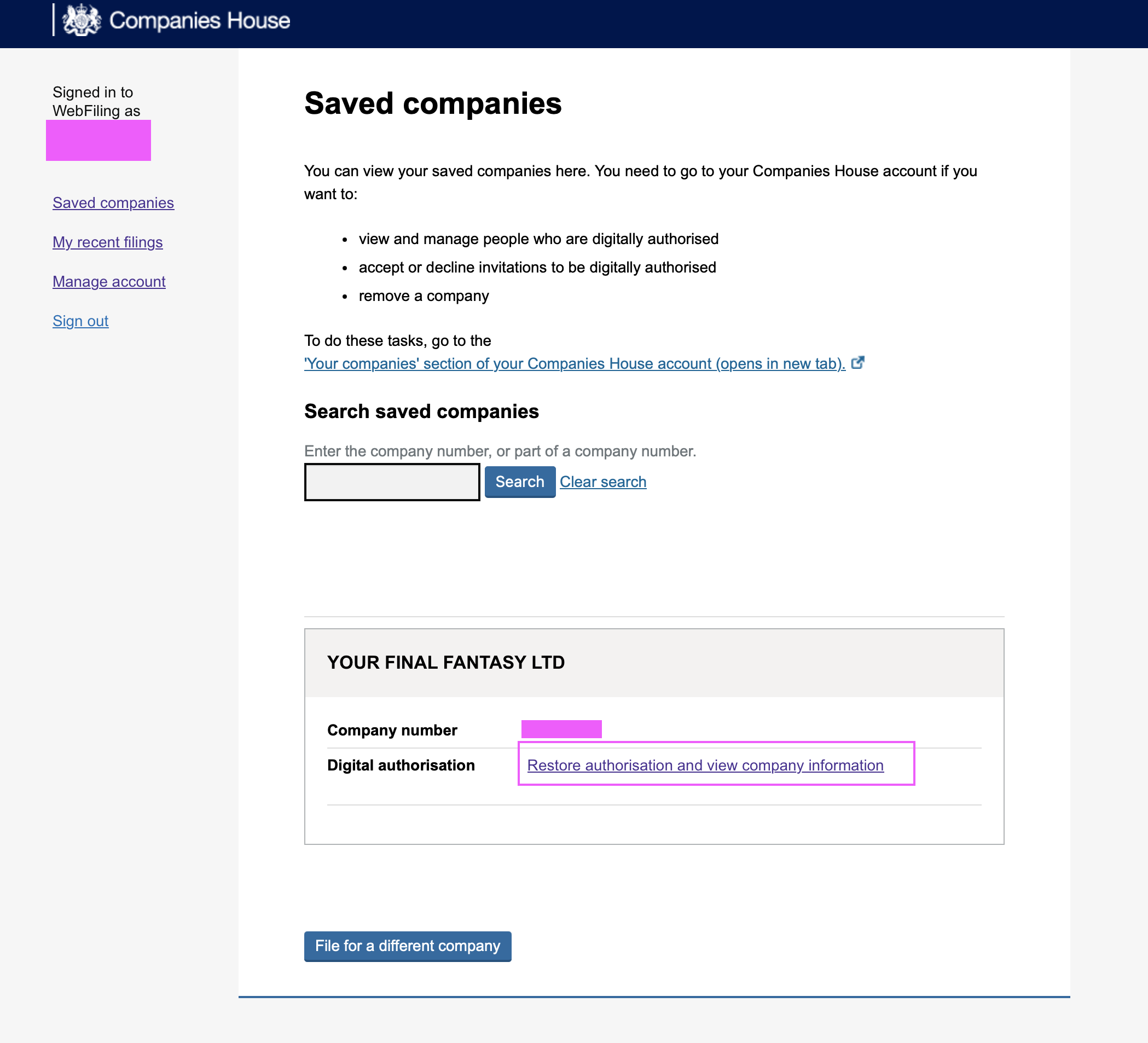
登录后进入 Saved companies 页面,能看到你名下保存的公司。在你的公司卡片里,点击 Digital authorisation 一行的 Restore authorisation and view company information。
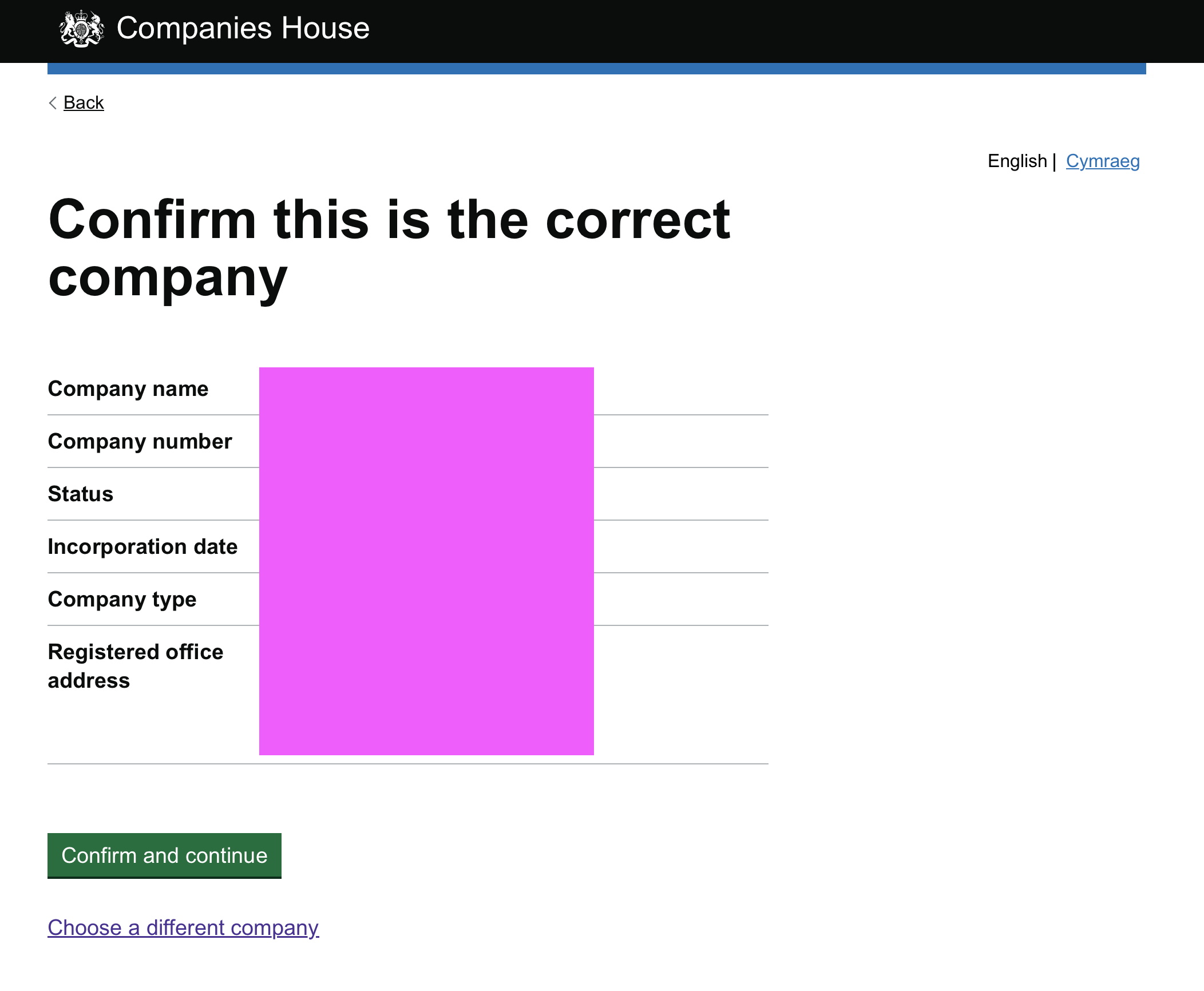
接着是 Confirm this is the correct company 页面,核对公司名称、公司编号、状态、注册日期、公司类型、注册办公地址这些信息,没问题就点 Confirm and continue。
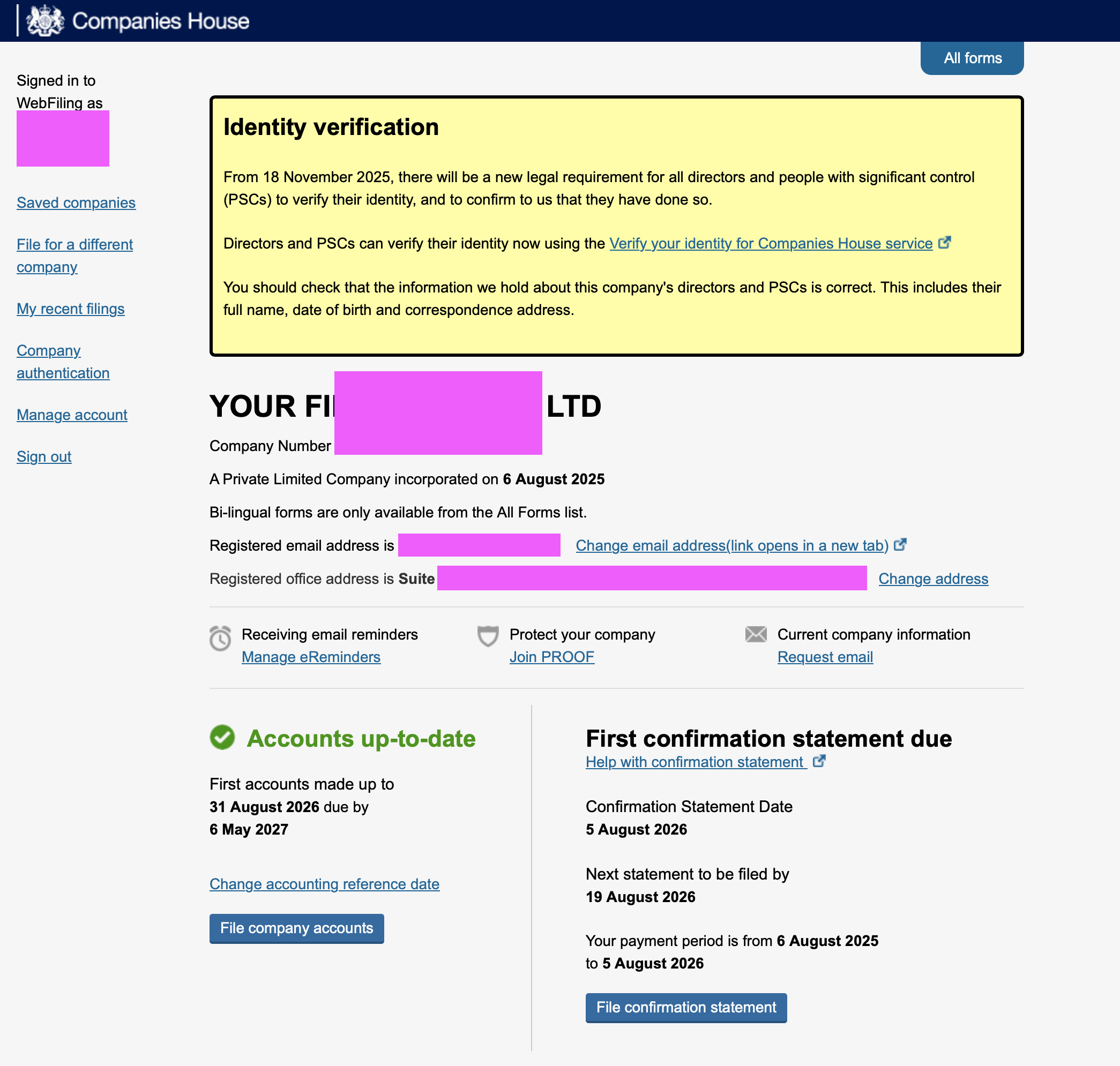
然后就进入了公司的总览页。这一页信息量比较大:
- 顶部有一个黄色的 Identity verification 提示框:从 2025 年 11 月 18 日起,所有 director 和 PSC(people with significant control,重大控制人)都必须完成身份验证
- 左边显示 Accounts up-to-date(我的年账还没到期,首份年账 2027 年 5 月 6 日前提交即可)
- 右边就是我们这次要办的事:First confirmation statement due,我的 Confirmation Statement Date 是 5 August 2026,最晚需要在 19 August 2026 前提交
点击右下方的 File confirmation statement 开始年审。
第四步:Director 身份验证确认
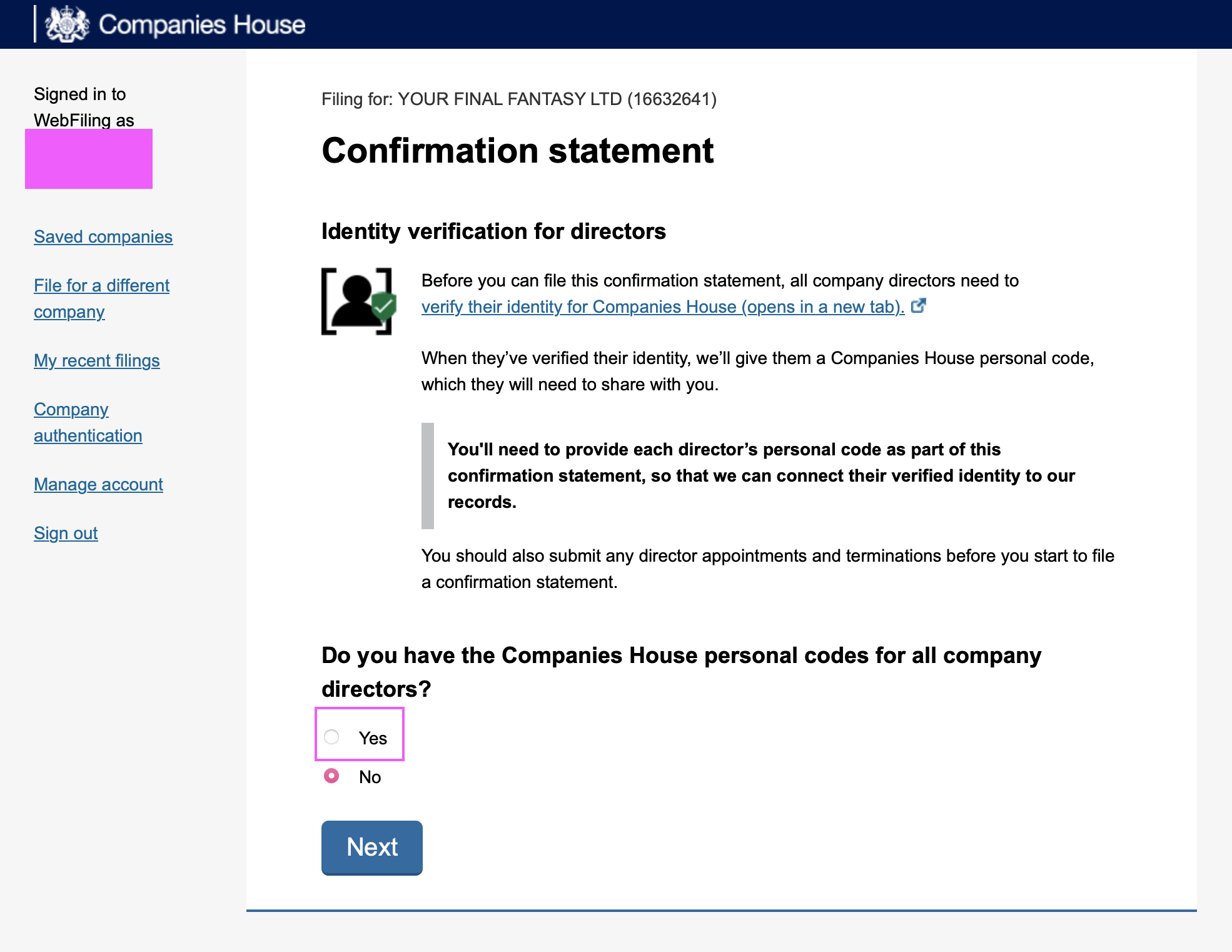
进入 confirmation statement 流程后,第一页是 Identity verification for directors。页面说明:在提交这份 confirmation statement 之前,所有公司 director 都需要完成 Companies House 的身份验证;验证完成后每人会拿到一个 Companies House personal code,你需要在这份 confirmation statement 里提供每位 director 的 personal code。
下面的问题:Do you have the Companies House personal codes for all company directors?(你有所有 director 的 personal code 吗?)——选 Yes,点 Next。(如果还没有,先去做身份认证拿到 personal code,参考我前面提到的身份认证教程。)
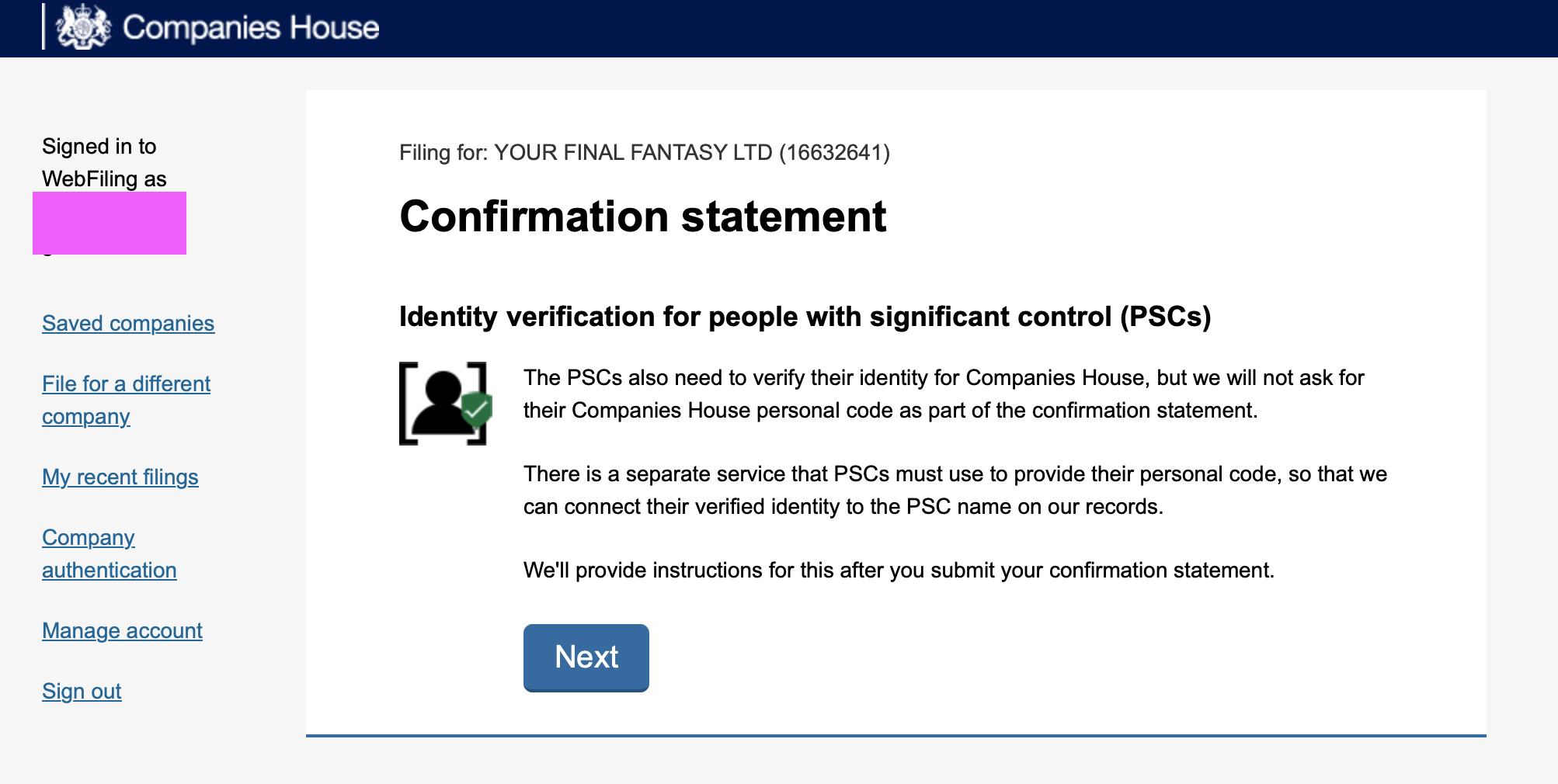
下一页是 Identity verification for people with significant control (PSCs)。这页是说:PSC 同样需要完成身份验证,但 confirmation statement 里不会要求填 PSC 的 personal code——PSC 要用一个单独的服务提交自己的 personal code,提交完 confirmation statement 之后官方会给出指引(我们在后面的步骤会做这件事)。直接点 Next。
第五步:正式开始填写 Confirmation Statement
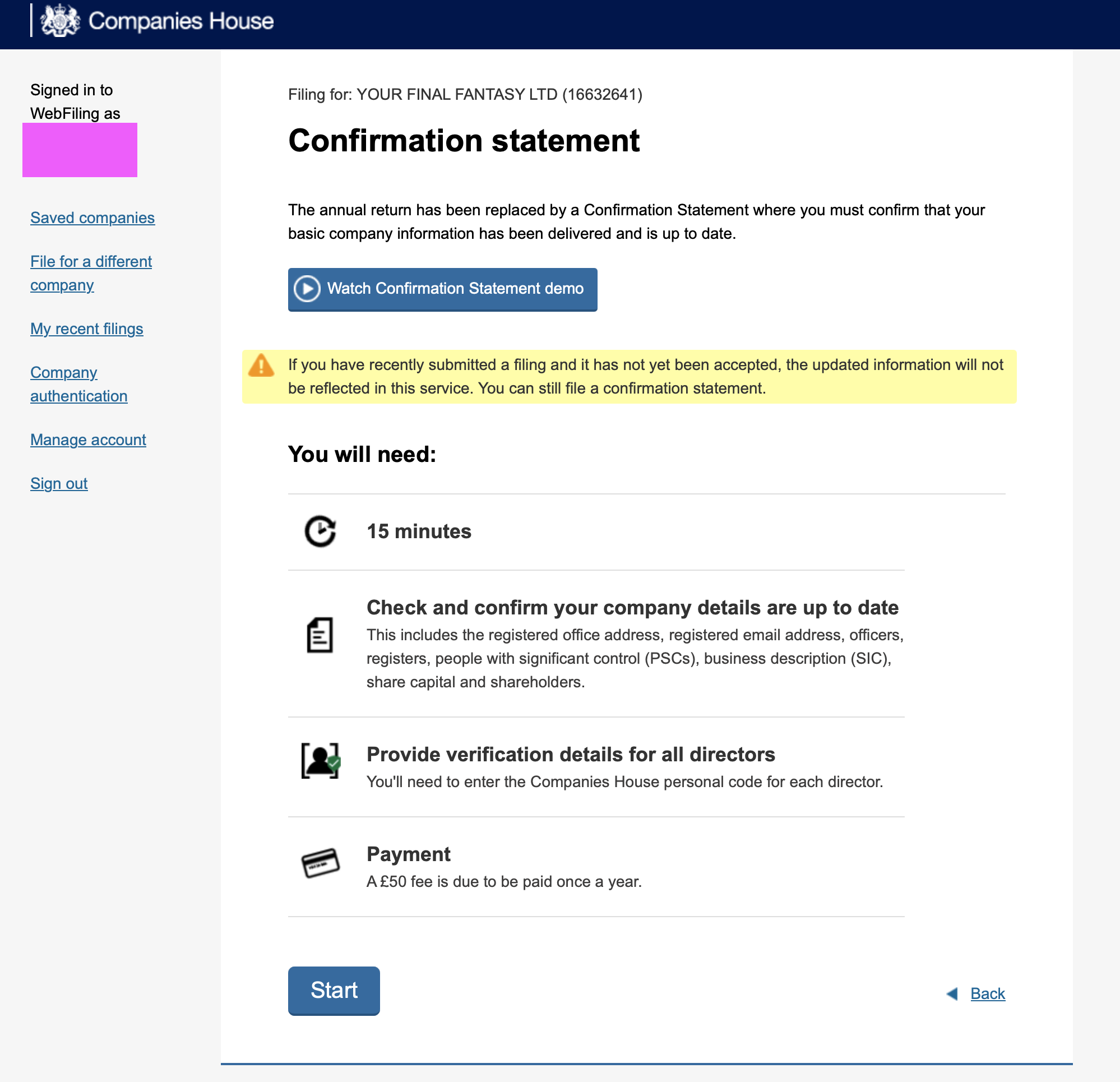
接下来是 confirmation statement 的开始页。页面说明:annual return 已经被 Confirmation Statement 取代,你需要确认公司的基本信息已经提交并且是最新的。You will need(你需要准备):
- ⏱ 15 分钟时间
- 📄 核对并确认公司信息是最新的:包括注册办公地址、注册邮箱、officers(董事/秘书)、各类登记册、PSC、业务描述(SIC 码)、股本和股东信息
- 🪪 提供所有 director 的验证信息:需要输入每位 director 的 Companies House personal code
- 💳 付款:每年一次的 £50 费用
点击 Start。
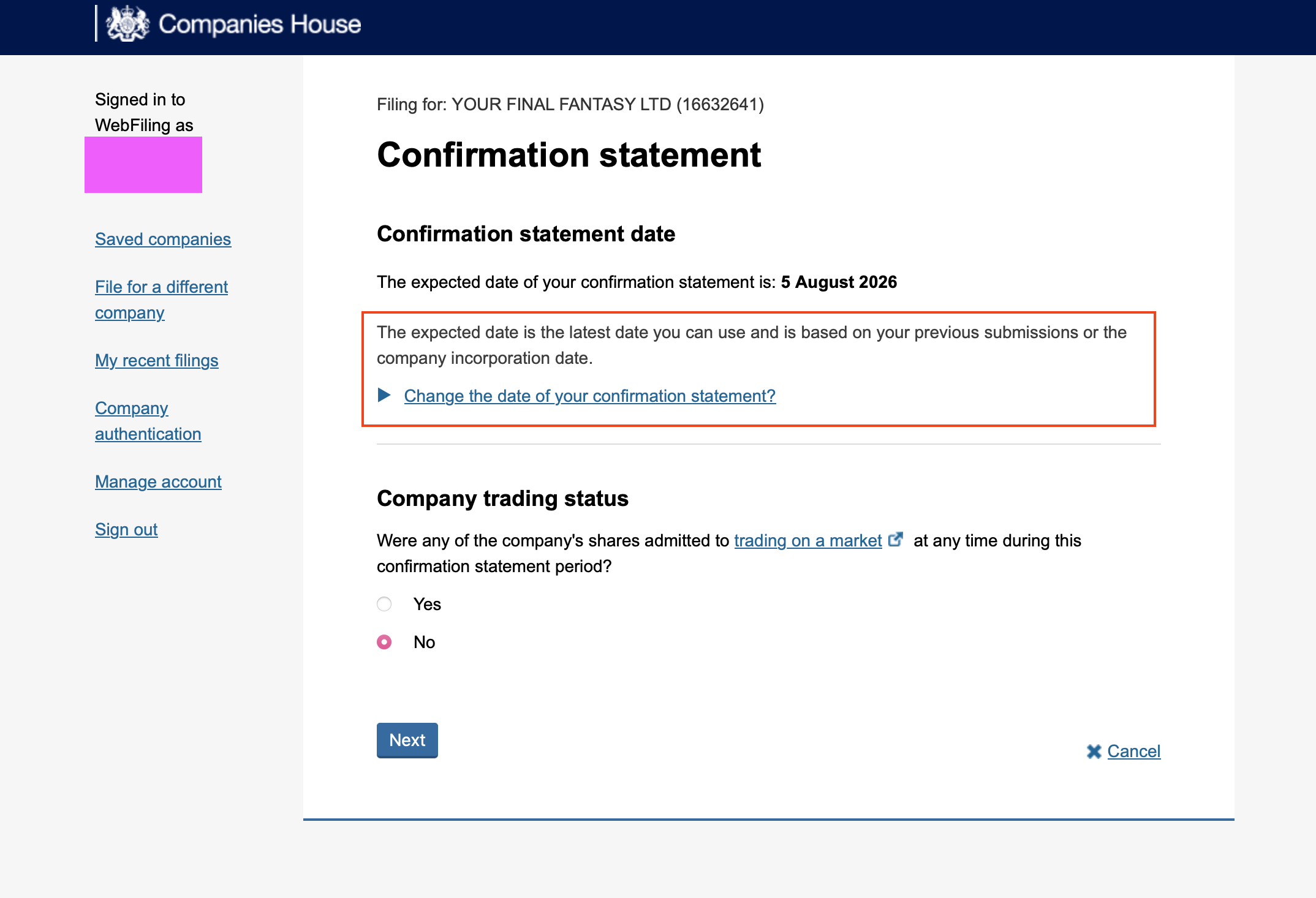
第一页是 Confirmation statement date(确认声明日期) 和 Company trading status(公司交易状态):
- 系统显示我的 confirmation statement 预期日期是 5 August 2026(这是你能用的最晚日期,基于你上次提交或公司注册日期计算,一般不用改)
- Were any of the company's shares admitted to trading on a market at any time during this confirmation statement period?(这段期间内公司股份是否曾在市场上公开交易?)——我们这种小公司选 No
点 Next。
第六步:逐项确认公司信息
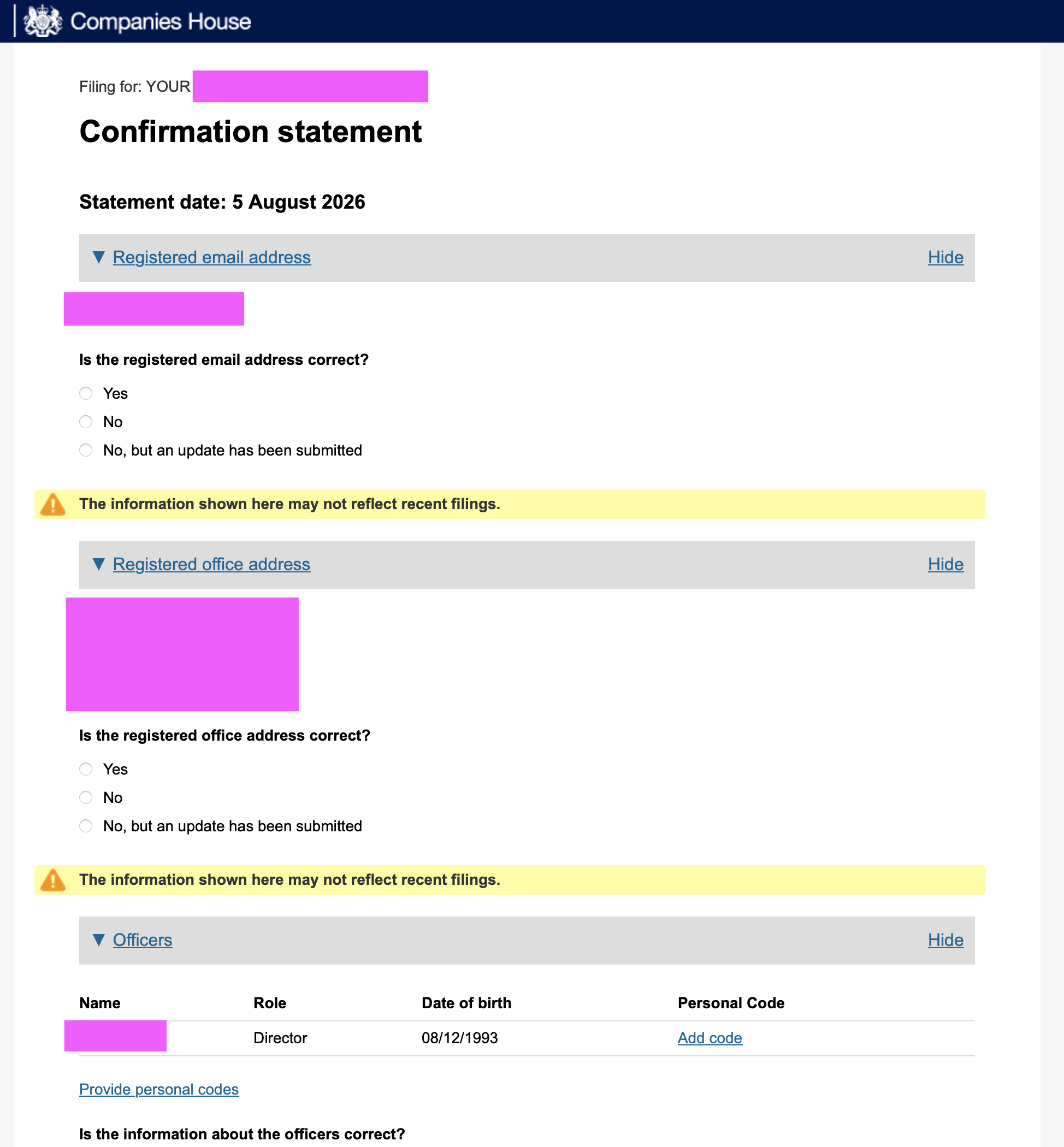
然后进入主表单,Statement date: 5 August 2026。表单会把公司信息一块一块列出来让你确认,每一块都问一句「这个信息是否正确」:
- Registered email address:Is the registered email address correct? → 选 Yes
- Registered office address:Is the registered office address correct? → 选 Yes
- Officers:列出了 director 的姓名、角色、出生日期,右侧有一列 Personal Code,点击 Add code 为每位 director 填入 personal code
(如果某项信息变了,选 No 或者「No, but an update has been submitted」,按页面指引先更新对应信息。)
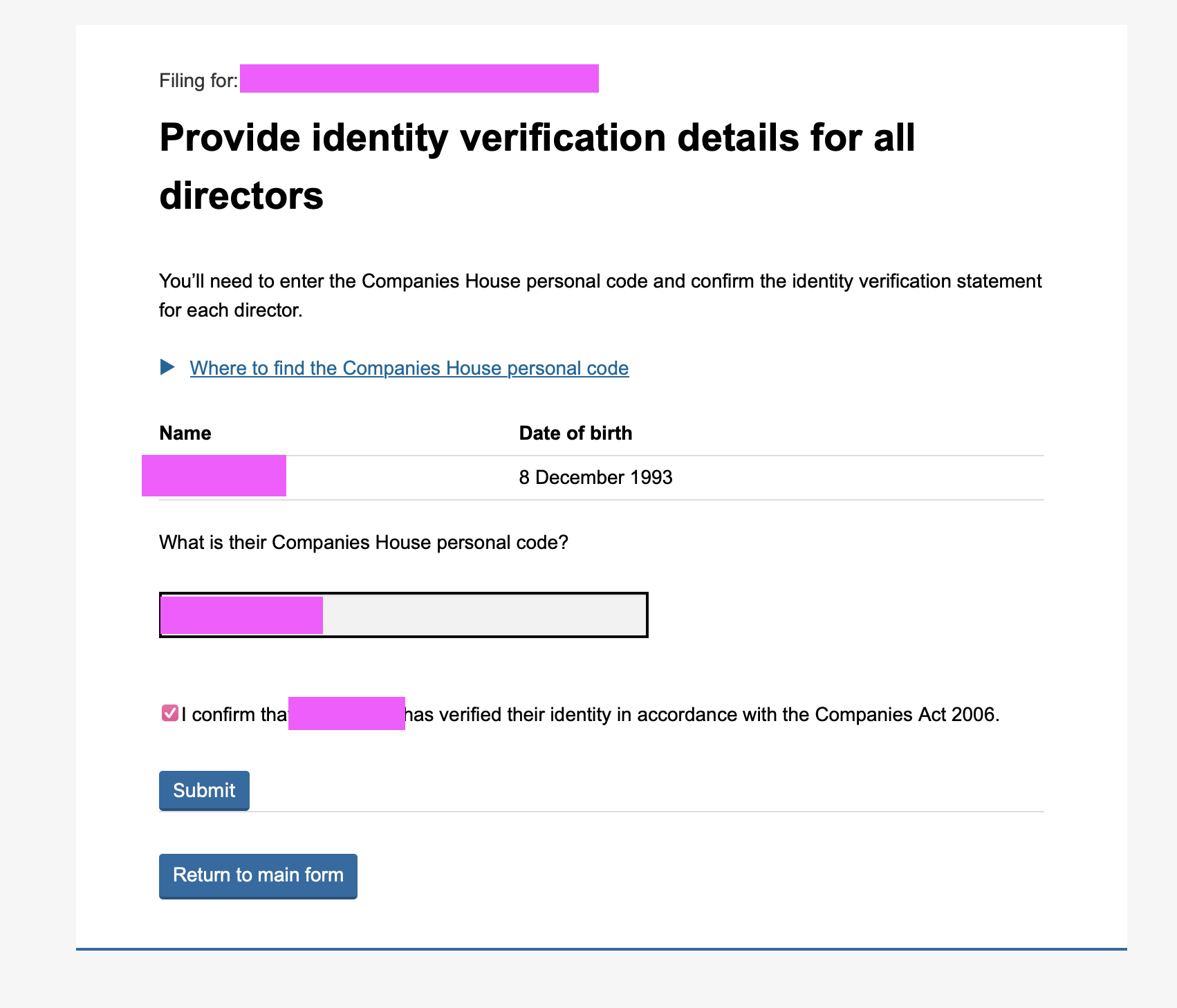
点击 Add code 后进入 Provide identity verification details for all directors 页面:输入这位 director 的 Companies House personal code,然后勾选下方的确认声明——I confirm that XXX has verified their identity in accordance with the Companies Act 2006(我确认 XXX 已根据 2006 年公司法完成身份验证),点 Submit。
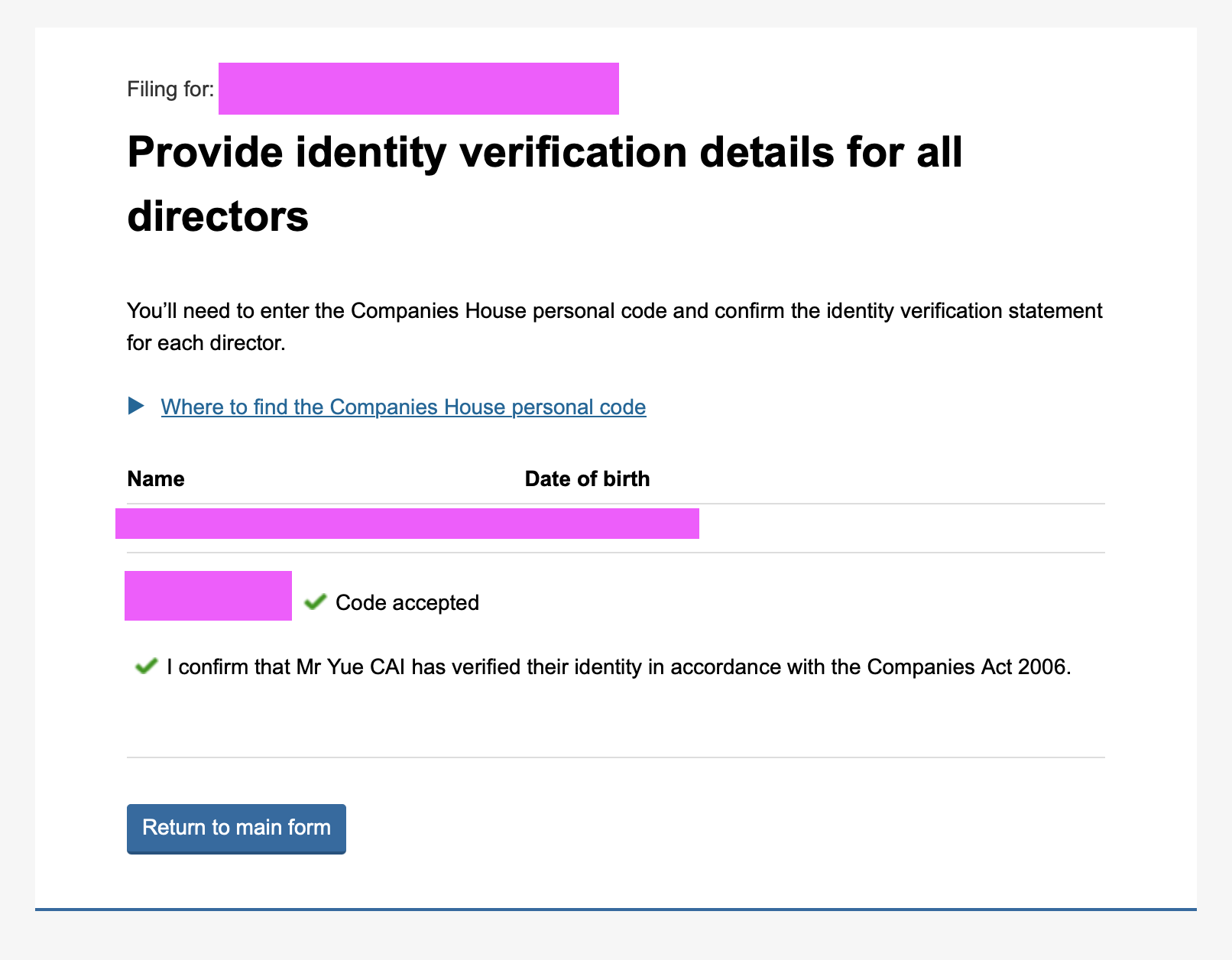
提交后回到列表,personal code 一栏会显示绿色对勾 ✅ Code accepted,确认声明也打上了勾。点 Return to main form 回到主表单,继续确认剩下的信息(SIC 码、股本、股东、PSC 等,都是核对一遍选 Yes 即可)。
第七步:付款(£50)
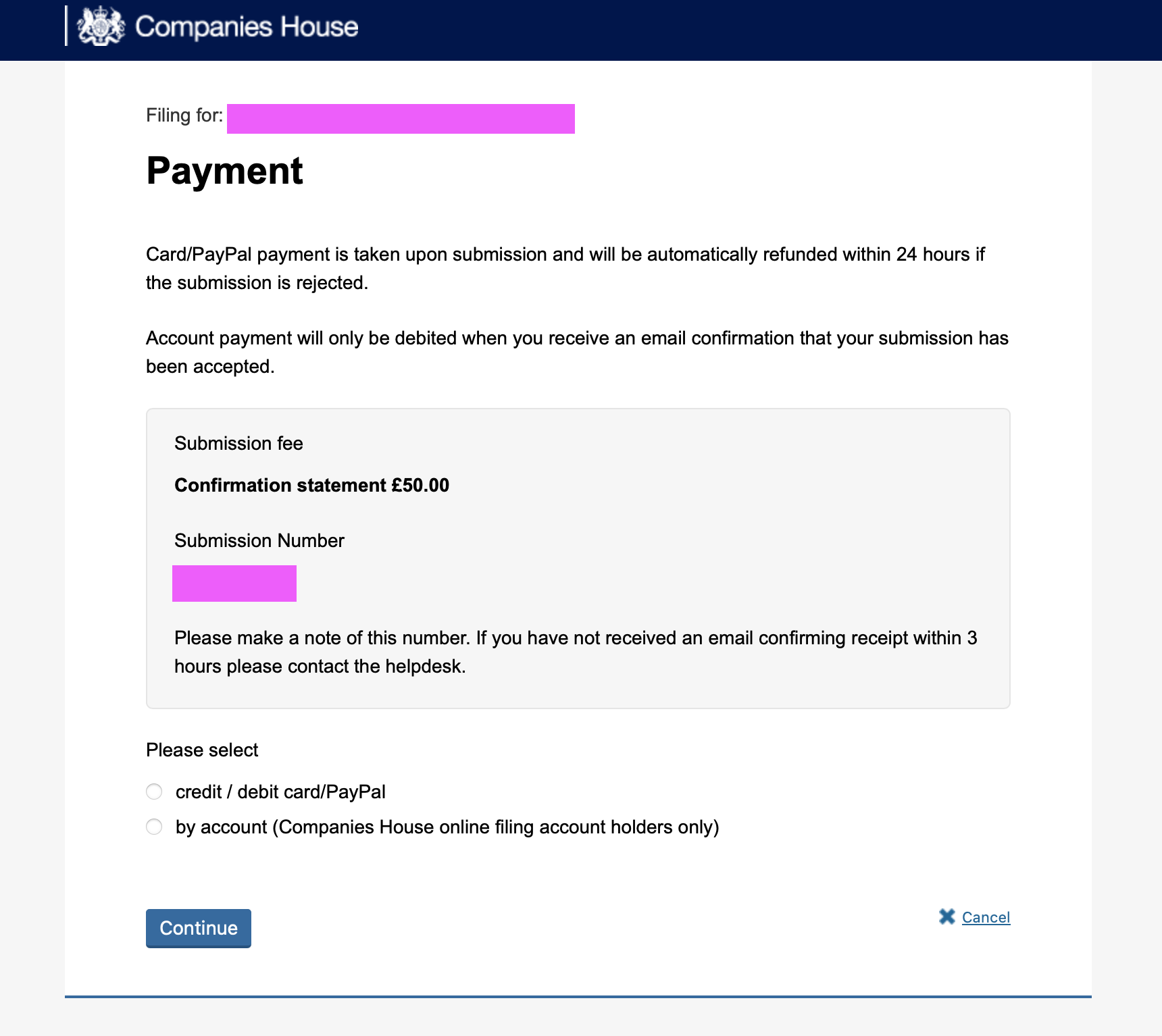
全部确认完之后进入 Payment 页面:
- Submission fee:Confirmation statement £50.00
- 页面会给你一个 Submission Number,记下来备用;如果 3 小时内没收到确认邮件,可以联系 helpdesk
- 付款说明:用卡 / PayPal 支付会在提交时扣款,如果提交被拒会在 24 小时内自动退款
支付方式选 credit / debit card/PayPal,点 Continue,然后走正常的付款流程即可。
第八步:提交成功,接着处理 PSC 身份验证
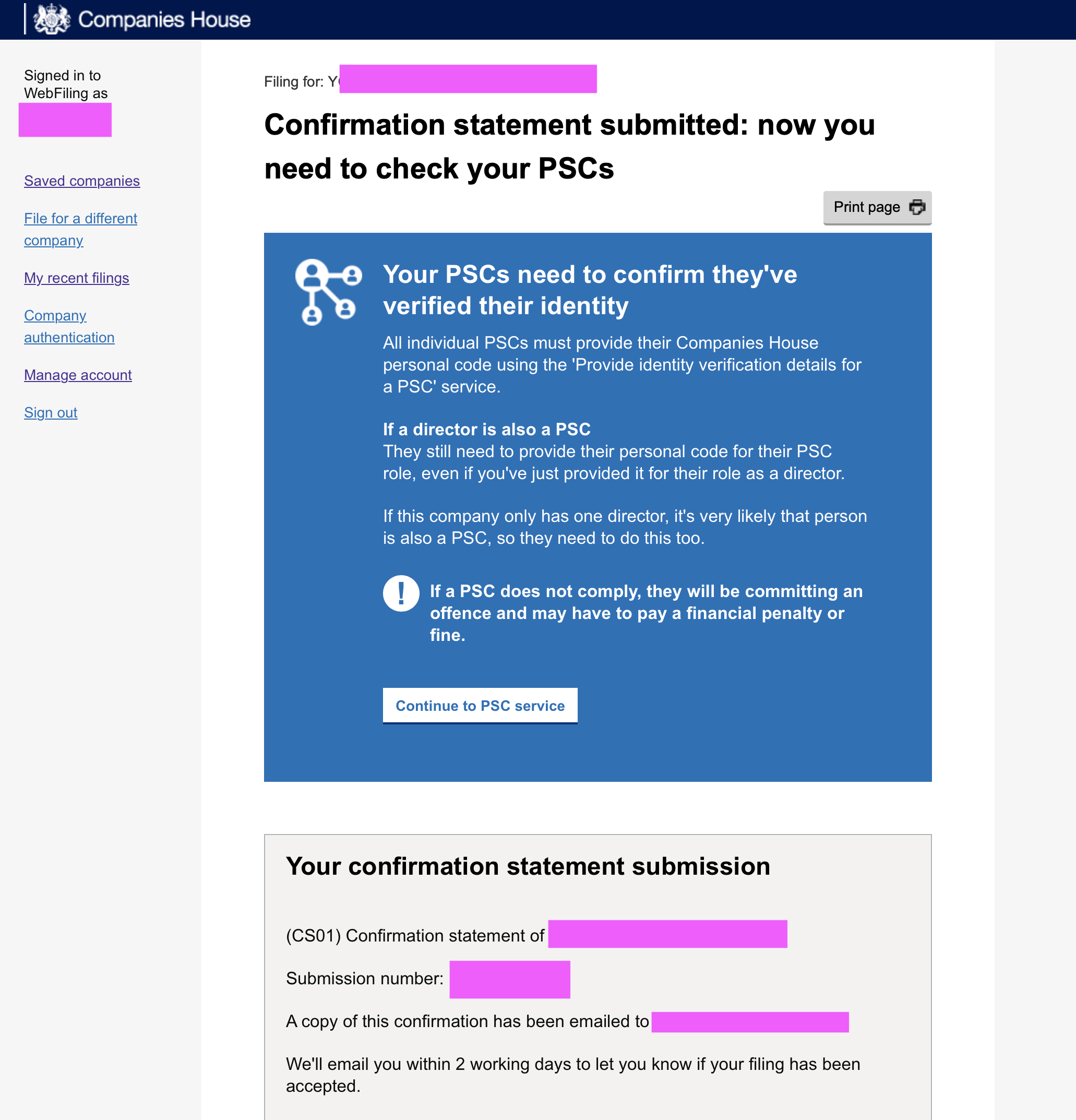
付款后看到 Confirmation statement submitted: now you need to check your PSCs 页面,confirmation statement 已经提交了 🎉。但还没完——蓝色提示框里说:
你的 PSC 需要确认他们已完成身份验证。所有个人 PSC 都必须通过「Provide identity verification details for a PSC」这个单独的服务提交自己的 Companies House personal code。
如果 director 同时也是 PSC(一人公司基本都是这种情况),即使刚才已经以 director 身份填过 personal code,仍然需要以 PSC 身份再提交一次。
如果 PSC 不配合,将构成违法,可能会被处以罚款。
页面下方还确认了:(CS01) confirmation statement 已提交,确认邮件已发到你的注册邮箱,官方会在 2 个工作日内邮件告知是否接受。
点击 Continue to PSC service 继续。
第九步:PSC 身份验证(一人公司也要做)
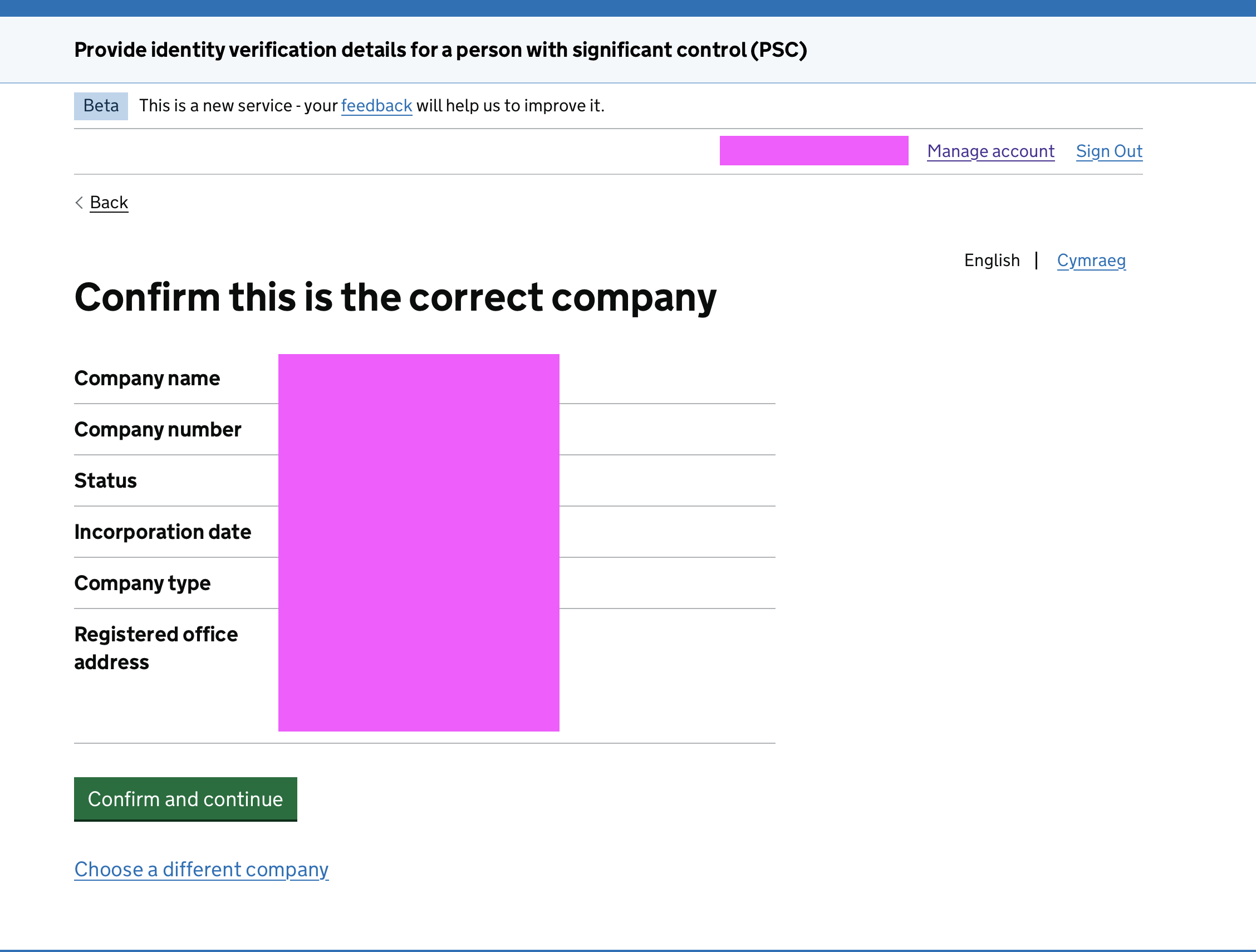
进入 Provide identity verification details for a person with significant control (PSC) 服务,先又是一遍 Confirm this is the correct company,核对公司信息后点 Confirm and continue。
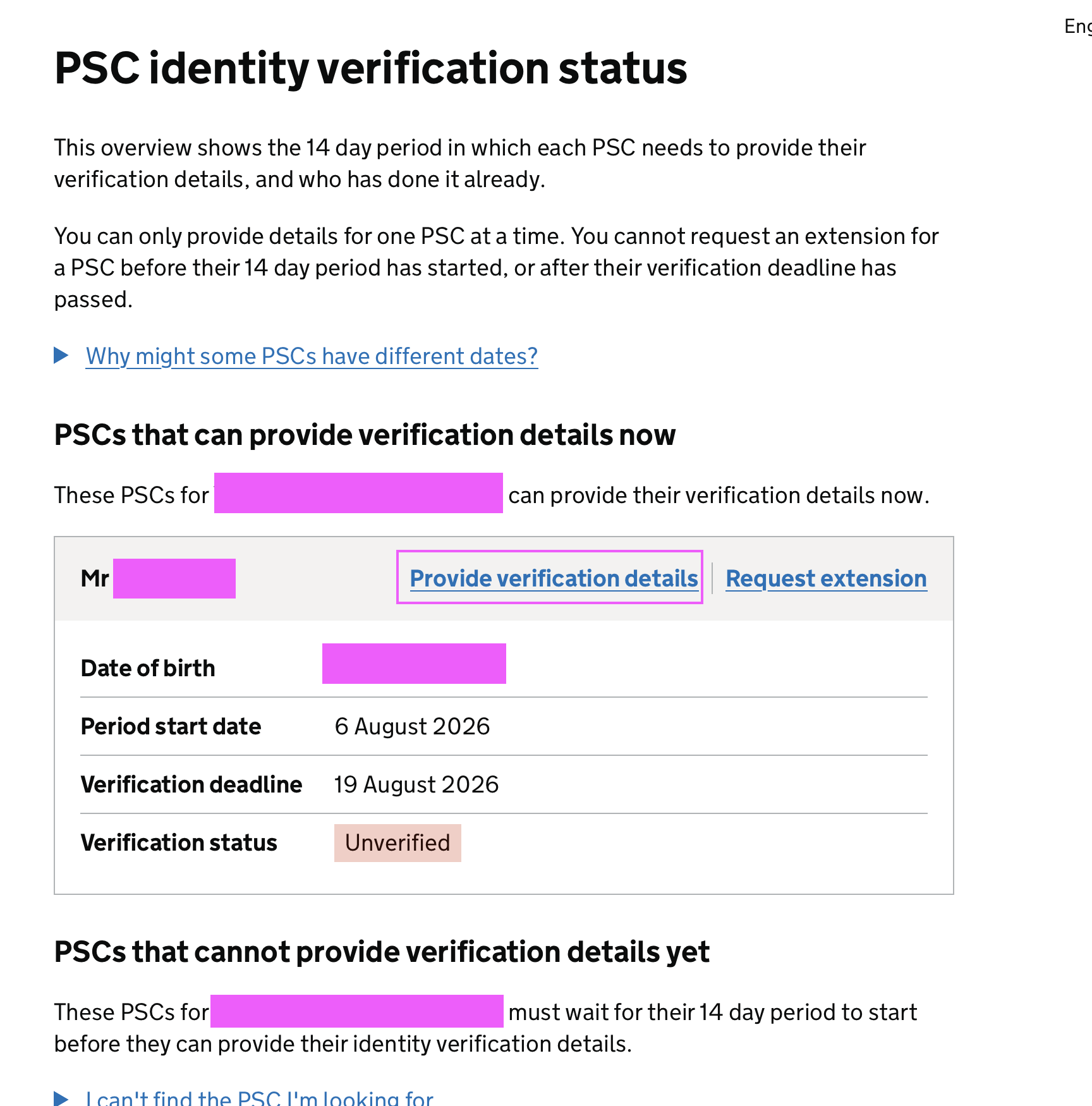
然后是 PSC identity verification status 页面,显示每位 PSC 需要在 14 天窗口期内提交验证信息:
- 我的 Period start date(窗口开始日期):6 August 2026
- Verification deadline(验证截止日期):19 August 2026
- Verification status:Unverified(未验证)
在你的名字那一行点击 Provide verification details。
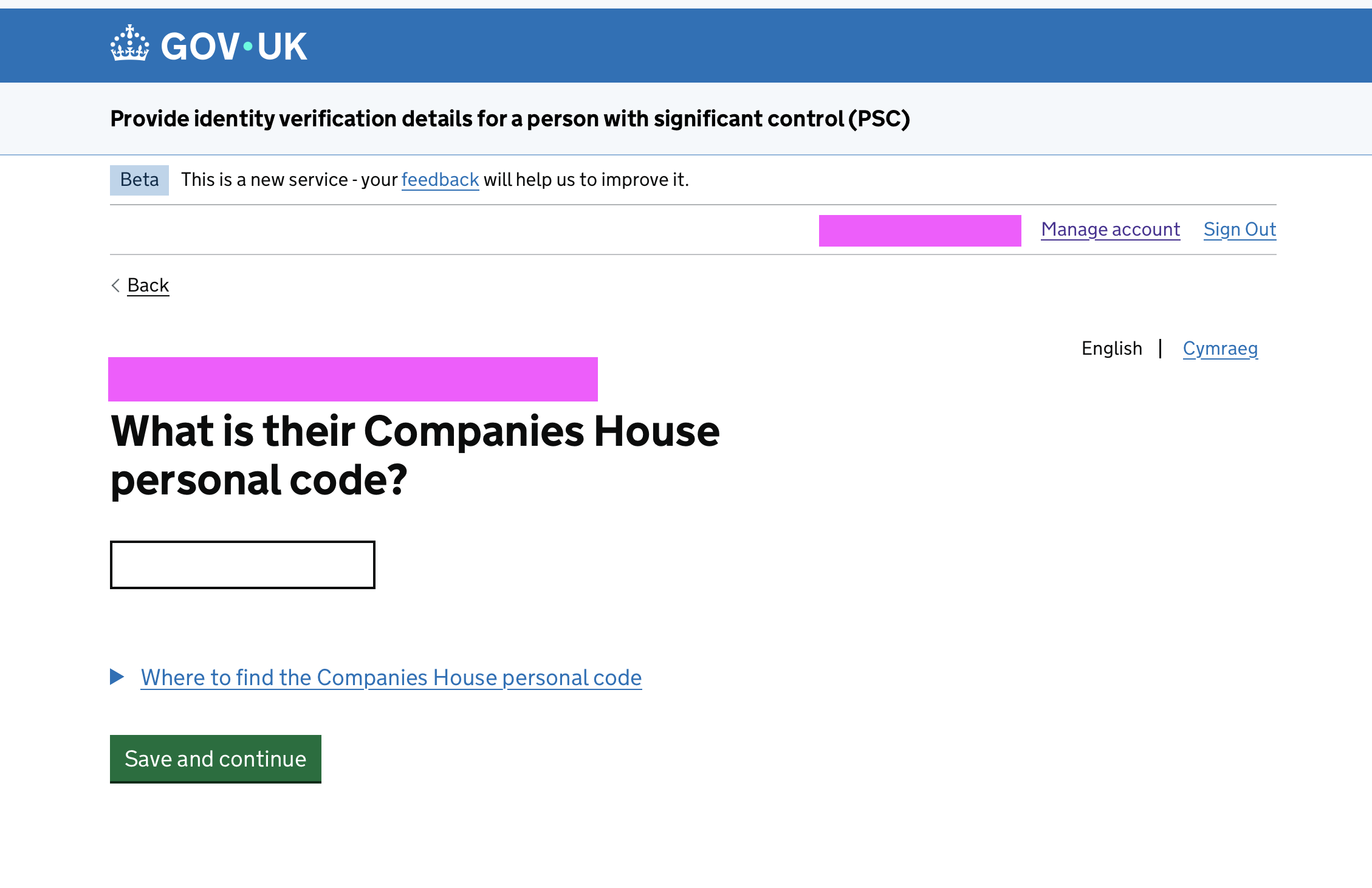
接着输入 PSC 的 personal code——What is their Companies House personal code?(就是你自己的那个 code,和刚才 director 用的是同一个),点 Save and continue。
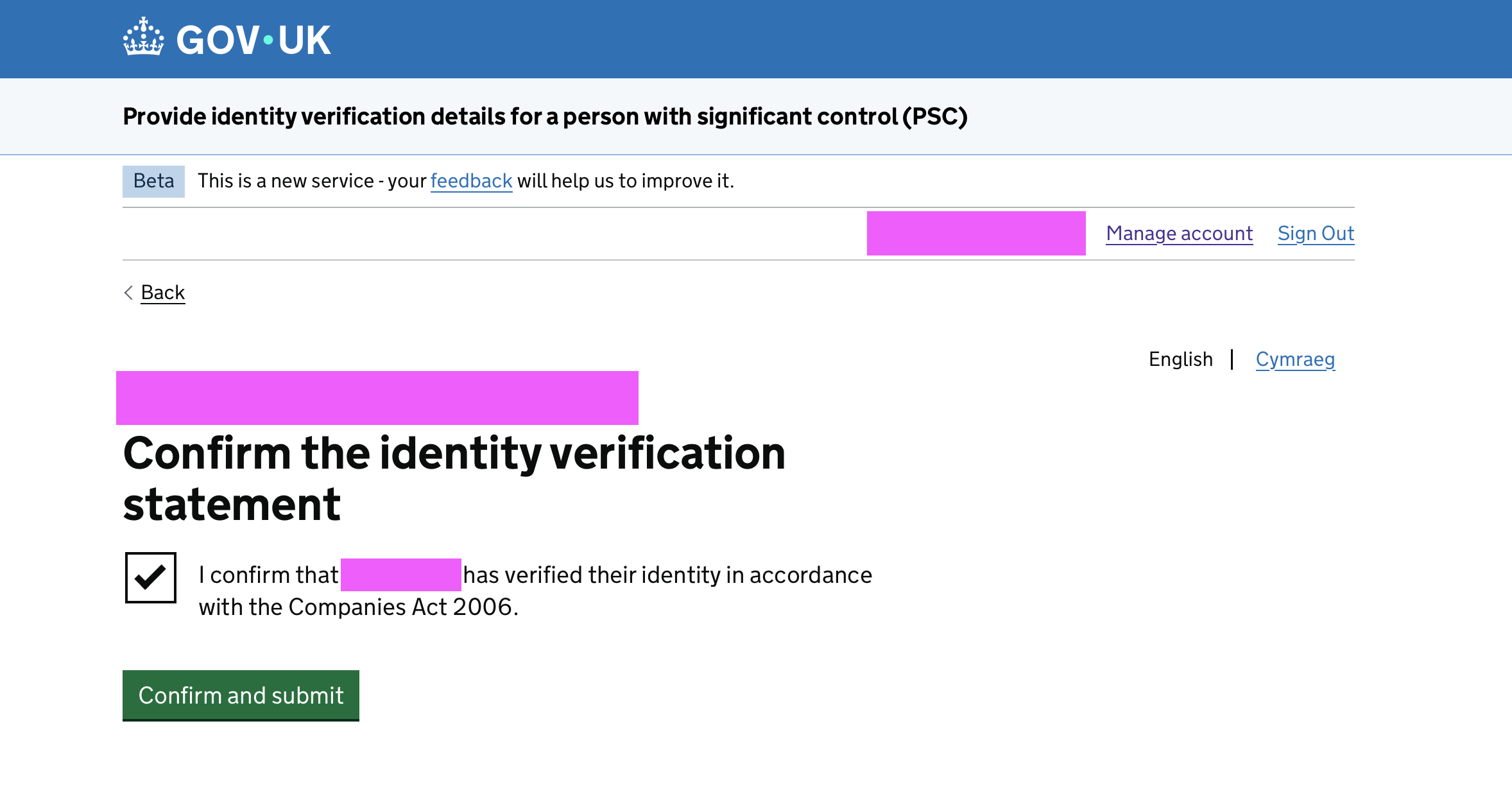
然后确认身份验证声明:勾选 I confirm that XXX has verified their identity in accordance with the Companies Act 2006,点 Confirm and submit。
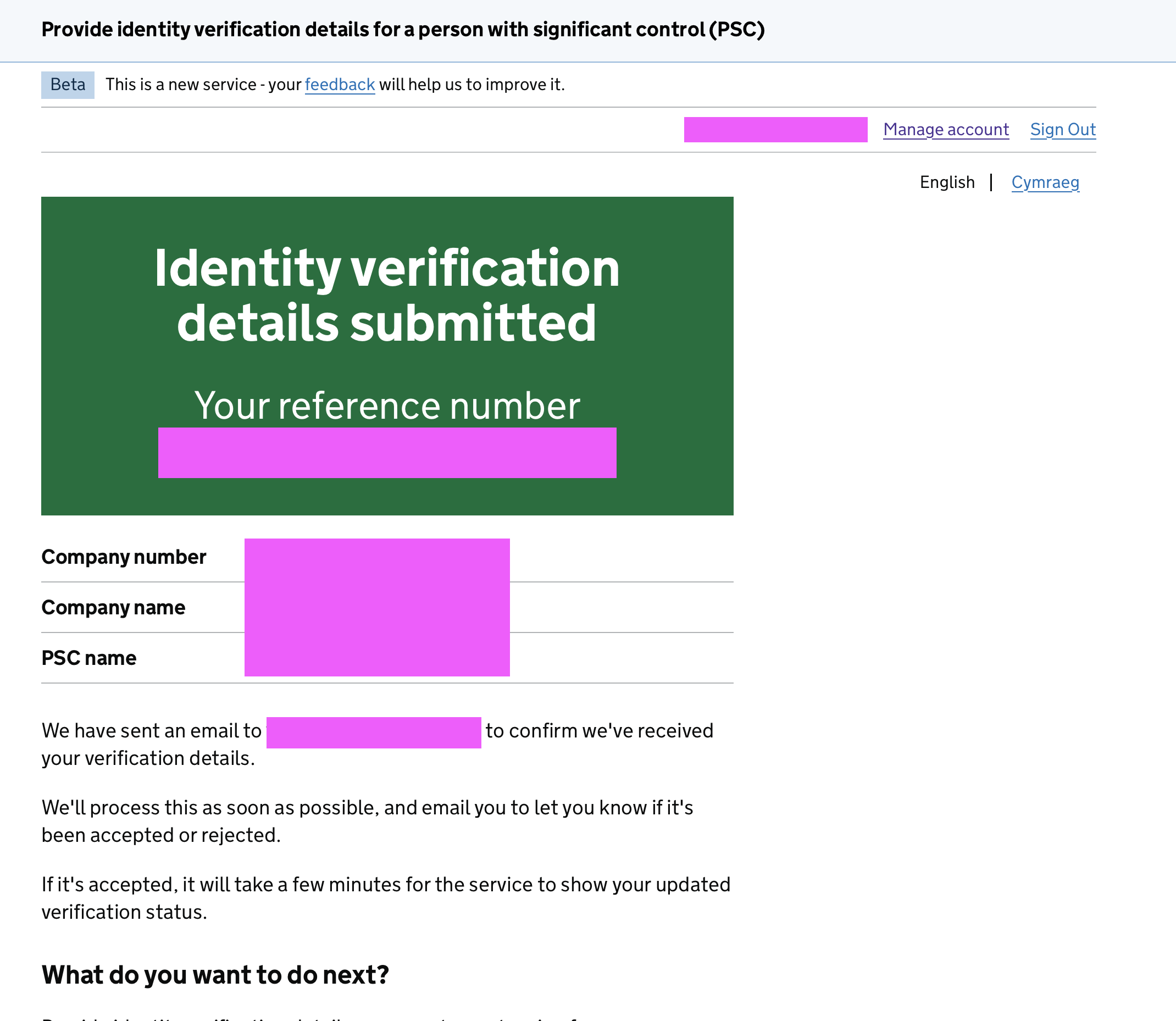
提交成功,看到绿色的 Identity verification details submitted 页面,会给你一个 reference number。官方会先发一封确认收到的邮件,处理完再邮件告知接受还是拒绝;如果被接受,几分钟后系统里的验证状态就会更新。
年审结果
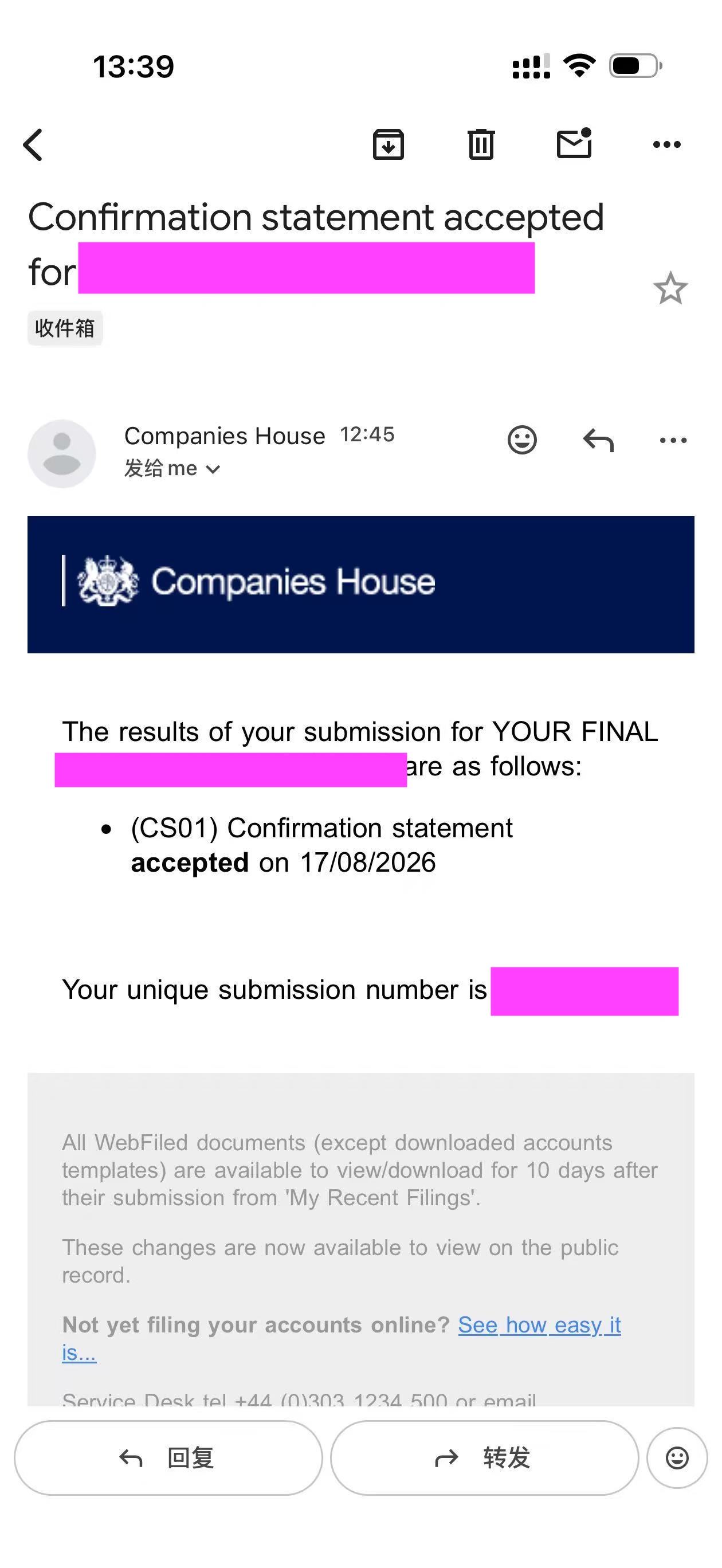
一般在付款成功不久之后,就会收到年审通过的邮件——Confirmation statement accepted:(CS01) Confirmation statement accepted on 17/08/2026,恭喜你,今年的年审就大功告成了 😄
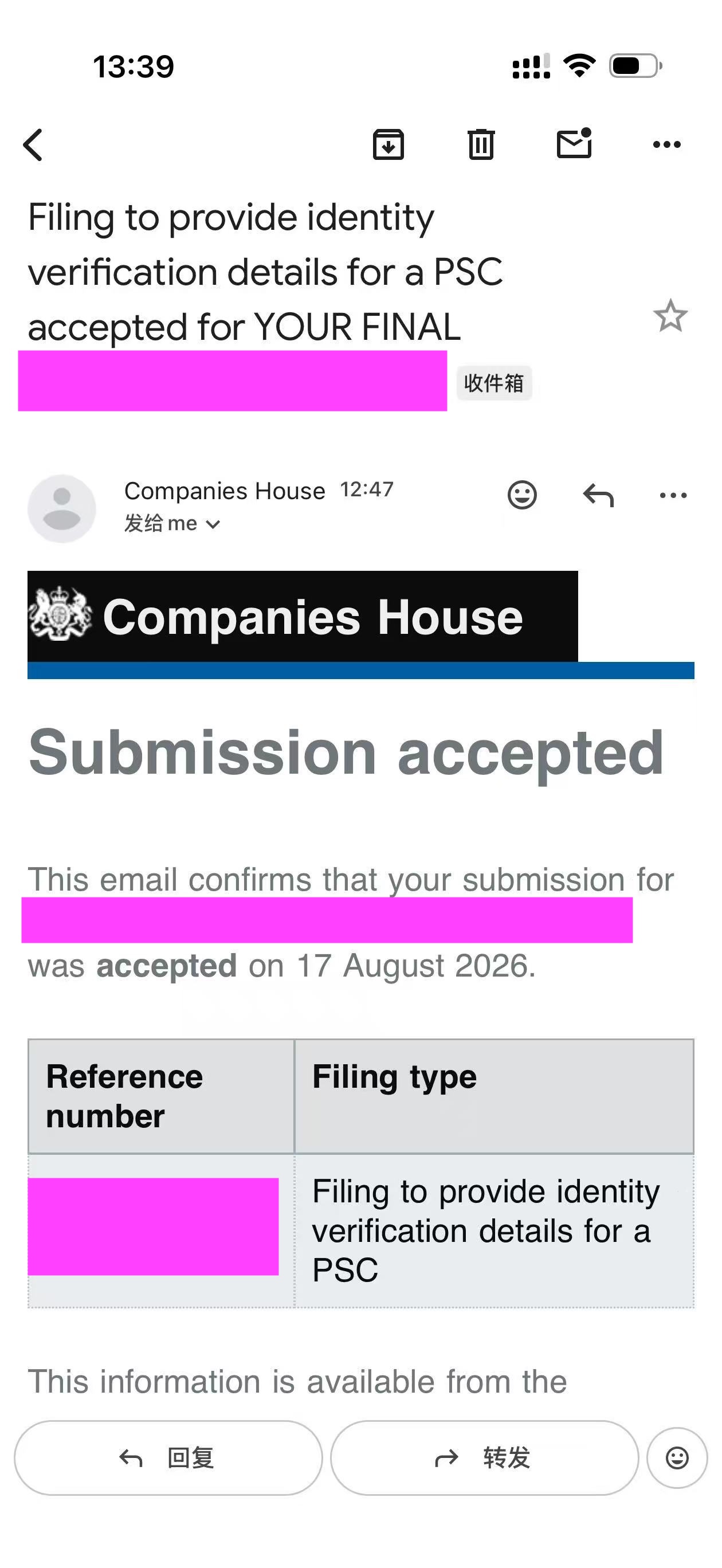
与此同时,如果你提交了 PSC 身份验证的话,也应当会收到另一封 accepted 邮件——Filing to provide identity verification details for a PSC accepted,Submission accepted。现阶段要做的事情也就告一段落了。恭喜!